MVisionPro Engineering Library · guide
How to calculate lens focal length and field of view when the working distance is fixed
In short
To calculate focal length and field of view at a fixed working distance, you need three inputs: the active sensor size, the field you must cover and the working distance. Find where the lens principal plane sits before you calculate: the working distance counts from there, not the housing. Then calculate the focal length from the field on one axis and the active sensor size. Pick a catalog lens whose image circle, focusing range and mount all fit. If that lens is shorter than calculated, its field is wider: recompute pixels per millimetre for this pair. If your smallest feature gets too few pixels, change the camera, the distance or the lens family.
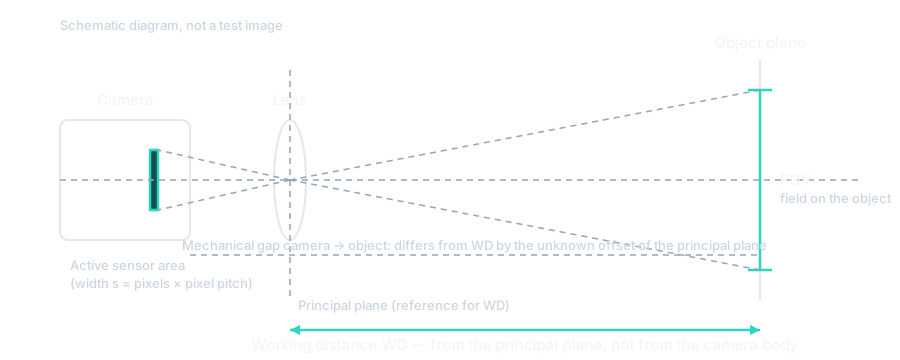
Work in this order
Start with the distance. The calculation counts it from the lens principal plane, the reference plane of the thin-lens formula. A machine drawing shows the gap between housings instead. Match the two using your lens documentation, or send us the part number and we will find that plane.
The field of view is the width and height the sensor sees on the object. Pair sensor width with field width, and height with height. Enter the field the machine really needs, including the spread in part position.
Take the active sensor size, the width and height of the pixel array, from the camera record. The optical format label, such as 2/3″, is a size class, not a measurement in inches.
The calculator returns the magnification, the sensor size divided by the field. It also gives the exact focal length and the nearest standard one below it. It rounds down because a longer lens narrows the field and cuts off the part. Last, it shows the field that lens gives at your distance. Rerun it with that field for the real sampling, the pixels per millimetre of the part. The formula and its limits are on the field of view reference page.
Three checks the focal length does not cover
The image circle, the lit circle the lens projects, must cover the sensor diagonal, or the corners go dark. A Ø9 mm circle covers the 8.93 mm reference diagonal of the 1/1.8″ format, but not a 2/3″ sensor (datasheet). A near match proves nothing either way. The 2/3″ camera below has an 11.01 mm active diagonal (calculated), and its candidate lens has a Ø11 mm circle. Circle tolerance and corner quality decide it: check the datasheet or a sample image.
The focusing range must include your distance. Fixed-focal lenses state a minimum object distance, the closest they focus to specification. Large-format lenses also state a far limit: LF9040M-M72 focuses at 722–1229 mm (datasheet), so it cannot work at 500 mm.
The mount must match the camera. Both 25 mm lenses below are C-mount (datasheet).
Aperture, diffraction and distortion
The aperture is the adjustable opening in the lens. Its F-number is the focal length divided by the opening's effective diameter, so a higher number means a smaller opening. Both 25 mm lenses here run from F2.8 to F16 (datasheet). Closing the aperture costs light but usually widens the depth of field: the range of part positions that stays acceptably sharp.
It also increases diffraction: light spreads at the opening, so even a perfect lens blurs a point into a small spot. In green light (520 nm), that spot is about 1, 2 and 3 of the cameras' 3.45 µm pixels (datasheet) across at f/2.8, f/5.6 and f/8 (calculated from Edmund Optics data). These figures use the f-number marked on the lens. At 500 mm the effective f-number is about 5% higher in the simple model, so the spot is slightly larger. Real lenses can add more blur. From about one pixel up, the spot starts to limit pixel-level detail, as a warning rather than a cut-off (rule of thumb: Edmund Optics, Schneider-Kreuznach).
Try f/4 first, as a starting point rather than an optimum: the spot is about 1.5 px, with about half the light of f/2.8 for the same scene (calculated). Keep the lowest F-number at which the depth you need passes on the real part. For features a few pixels wide, compare f/2.8, f/4 and f/5.6 before closing to f/8 or f/11.
Distortion is a change of scale across the field, so straight lines bend near the edges. MVL-HF2528M-6MPE lists −0.028% (datasheet). If that is radial distortion at the corner of the example's 134.2 × 100.7 mm field, the corner shifts about 23.5 µm, or 0.36 px. That is a conditional estimate, not a measured error.
Small distortion often does not decide a presence check or code read, but test decoding at the field edges. For sizes, positions or robot coordinates, check the exact lens's figure and its definition. Then calibrate with a manufactured dot or checkerboard target at your distance, light and focus, and check the error left after correction. For MVL-MF2528M-8MP, do not borrow a similar model's figure: send us the part number and we confirm the distortion specification.
What to change when the field does not fit
- Keep the shorter lens and its wider field, if the sampling still meets the task and no fixture enters the frame.
- Change the camera: a larger sensor needs a longer focal length for the same field, and more pixels raise the sampling.
- Change the distance, if the machine allows, to the one the tool reports for that focal length.
- Move to another lens family, chosen on published coverage and focusing data, not focal length alone.
Cropping only removes unwanted parts of an image already taken. It cannot win back lost pixels per millimetre, narrow the optical field or fix an undersized image circle.
When a telecentric lens is the answer instead
Telecentric lenses are chosen to control magnification and perspective. The compact variants are specified by magnification and a fixed working distance, not focal length. Fit the machine to that distance, then check the depth of field: 4.5 mm for MVL-HY-05-510C at 0.5× and 510 mm (datasheet). At 0.5× the field is twice the sensor width, far short of 120 mm, so these lenses answer perspective error, not a wide field.
Worked example: 120 mm at a fixed 500 mm on two cameras
Assume the machine holds the optical distance at 500 mm and the part needs a field 120 mm wide. The height follows each sensor's aspect ratio.
| Step | MV-CA032-10GM (1/1.8″) | MV-CA050-12UM (2/3″) | Origin |
|---|---|---|---|
| Pixels | 2048 × 1536 at 3.45 µm | 2448 × 2048 at 3.45 µm | datasheet |
| Active sensor | 7.07 × 5.30 mm | 8.45 × 7.07 mm | calculated |
| Requested field | 120 × 90 mm | 120 × 100.4 mm | assumption |
| Calculated focal length | 27.8 mm | 32.9 mm | calculated |
| Standard focal length, rounded down | 25 mm | 30 mm | calculated |
| Sampling at the requested field | 17.1 px/mm | 20.4 px/mm | calculated |
| Field of a 25 mm lens at 500 mm | 134.2 × 100.7 mm | 160.5 × 134.2 mm | calculated |
| Sampling with that 25 mm lens | 15.3 px/mm | 15.3 px/mm | calculated |
On the 1/1.8″ camera, the 25 mm lens gives 14.2 mm more width than needed (calculated). MVL-HF2528M-6MPE is such a lens: its Ø9 mm circle covers the format, and it focuses from 0.2 m, well inside 500 mm (datasheet). A 30 mm lens would be too long: it needs 539.5 mm to see 120 mm (calculated).
On the 2/3″ camera, the tool's 30 mm is a standard value, not yet a lens. The 30 mm lens in the 1/1.8″ category has a Ø9 mm circle, too small for this sensor. The large-format MVL-LF3040M-005-M72 is also 30 mm, with a Φ58 mm circle and a 205–1000 mm focusing range (datasheet). Its M72 × 0.75 mount makes it an interface decision, not a lens swap. So step down to 25 mm in the 2/3″ category. At 500 mm that lens covers 160.5 mm, 40.5 mm more than needed (calculated). The candidate is MVL-MF2528M-8MP: 25 mm, Ø11 mm image circle, C-mount, 0.1 m minimum object distance (datasheet). Send us that part number, and we will confirm coverage and corner quality.
At the same 120 mm field, the 2/3″ camera samples more finely: 20.4 against 17.1 px/mm. That compares requirements, not installed systems. With a real 25 mm lens at 500 mm, both give 15.3 px/mm, or 65.6 µm of the part per pixel (calculated). The pixel size, lens and distance are the same, so the larger sensor adds field, not detail. Check 15.3 px/mm against your smallest feature.
Calculate for your case
Open the 1/1.8″ case or the 2/3″ case. Each link fills in the camera, both field sizes and the distance. Replace them with your own. The 0.1 mm feature, 5 px across it and 0 mm/s speed in the address belong to other questions. For the chosen 25 mm lens, rerun the tool with its unrounded field: 134.2464 × 100.6848 mm for MV-CA032-10GM, or 160.4664 × 134.2464 mm for MV-CA050-12UM. Rounded inputs can tip the calculated focal length just below 25 mm and change the lens the tool picks.
Equipment that fits this example
Besides the two lenses in the example, other 25 mm lenses in the 1/1.8″ and 2/3″ categories differ in aperture, image circle and minimum object distance. Send us the part number, and we will check that variant against its datasheet.
Common mistakes
- The distance is taken from the machine drawing, between housings. Match it to the principal plane first, and treat the result as preliminary until the offset is known.
- The focal length is ordered like a part number. Confirm image circle, focusing range and mount on the exact variant's record, not a family range.
- The wider field of the shorter lens goes unchecked, though it costs pixels on the part. Recompute the sampling for the real pair against your smallest feature.
- A lens of the same focal length from another family is treated as a swap. Check mount and format first: the 30 mm M72 × 0.75 lens above needs another mechanical interface.
When this rule breaks
The calculation is a thin-lens model: it gives field, focal length and sampling for choosing a lens, not a mechanical drawing. Edge sharpness and distortion come from the lens datasheet and a sample image of your part. The modulation transfer function (MTF) describes that sharpness: the contrast a lens keeps for fine and coarse detail across the frame.
The order fails when no catalog lens reaches the field you need at your distance. Then change the distance, the camera or the number of cameras, whichever the calculation shows will work.
Next step
Send us the camera model or active sensor size, the field on a named axis, and your machine's distance. We recalculate against the catalog and check image circle, focusing range and mount on the exact variant. If the geometry does not work out, we say so plainly.
Sources
- MVisionPro engineering calculator and Hikrobot catalog records (datasheet fields); calculations, the tool page and the public API were verified on 2026-09-19
- The f-number is the focal length divided by the entrance-pupil diameter, so a larger f-number means a smaller aperture: Basler, https://www.baslerweb.com/en/learning/lens-selection/ (checked 2026-09-21)
- For an ideal circular aperture, the Airy-disk diameter is approximately 2.44 × wavelength × f-number (the working f-number at close range); at 520 nm it is 3.55 µm at f/2.8, 7.11 µm at f/5.6 and 13.96 µm at f/11, and a spot larger than the pixel makes the sensor's full resolution hard to use: Edmund Optics, https://www.edmundoptics.com/knowledge-center/application-notes/imaging/limitations-on-resolution-and-contrast-the-airy-disk/ (checked 2026-09-23)
- A diffraction spot comparable to the pixel or larger starts to limit pixel-level detail: Schneider-Kreuznach, https://schneiderkreuznach.com/en/industrial-optics/knowledge-hub/matching-lenses-and-sensors (checked 2026-09-23)
- Distortion is a change of magnification across the field, quoted as a percentage for a field position: Edmund Optics, https://www.edmundoptics.com/knowledge-center/application-notes/imaging/distortion/ (checked 2026-09-23)
- Grid calibration corrects nonlinear and lens distortion; high accuracy needs a manufactured calibration target: Cognex, https://docs.cognex.com/is-usp_2520/web/EN/InSight_Sheet/Content/Topics/Spreadsheet/VisionTools/CalibrateGrid.htm (checked 2026-09-23)
Related
How this material was prepared
Prepared by MVisionPro from the stated sources and the MVisionPro calculation engine. A physical test is claimed only when the material says so explicitly. Read the editorial method.
Editorial status: verified. Content updated 2026-09-25.